 Featured partnerSign up to Lightyear and get up to €100 in a free fractional shareCapital at risk, terms apply. Seek guidance if necessary. Claim Up to €100 Capital at risk, terms apply. Seek guidance if necessary.
 - Two brokers open to EU investors offer official AI connectors. Interactive Brokers since June 2026 and eToro since 8 October 2026. Both link your account to ChatGPT, Claude or Grok without sharing your password or an API key.
- Both are easy to set up, but Interactive Brokers has a slight edge. Its AI cannot execute trades directly. It drafts instructions, and you confirm every order inside the IBKR app, which adds an extra security barrier.
- eToro lets the AI act from the chat. With read-and-act access, where available, the assistant can carry out an order once you confirm it in the conversation. Read-only access is also offered, and deposits and withdrawals stay in eToro.
- Read-only is a trading control, not a privacy setting. Your holdings and balances are sent to the AI provider with each question, so check its data settings before you connect.
If you invest in Europe and want ChatGPT, Claude or Grok to answer questions about your real portfolio, two brokers now make it official. Interactive Brokers has offered its AI Integration since June 2026, and eToro launched its own connectors on 8 October 2026. Both use the Model Context Protocol (MCP), an open standard that lets an AI assistant plug into an outside service, and both let you sign in on the broker's own page instead of handing your password or an API key to the AI. Trading 212, another popular choice in Europe, has no official AI connector yet.
Our verdict: both connectors are easy to set up, taking a few minutes with no coding, but Interactive Brokers has a slight edge. Its AI cannot execute trades directly. It can only draft instructions, and you confirm every order inside the IBKR app, which puts an extra security barrier between a chat and your money. eToro's connector goes further: with read-and-act access, where available, the AI can carry out an order once you confirm it in the chat. For most investors, the sensible way to use either is read-first: ask questions, check the answers and make decisions yourself.
This guide covers what each broker lets the AI see and do, how to set it up, the controls that keep you in charge and the risks, including what happens to your data under GDPR. Everything was checked against eToro's and Interactive Brokers' official pages on 16 October 2026.
eToro is a multi-asset investment platform. The value of your investments may go up or down. Your capital is at risk. 51% of retail investor accounts lose money when trading CFDs with this provider. When investing with Interactive Brokers, your capital is at risk. AI-generated output is not investment advice.
At a glanceeToro vs Interactive Brokers AI connectors
The two connectors solve the same problem in different ways. The table sets them side by side on the points that matter most for EU investors.
Capabilities vary by assistant, plan and country. Check the current details with each broker before you connect.
The basicsHow broker AI connectors work
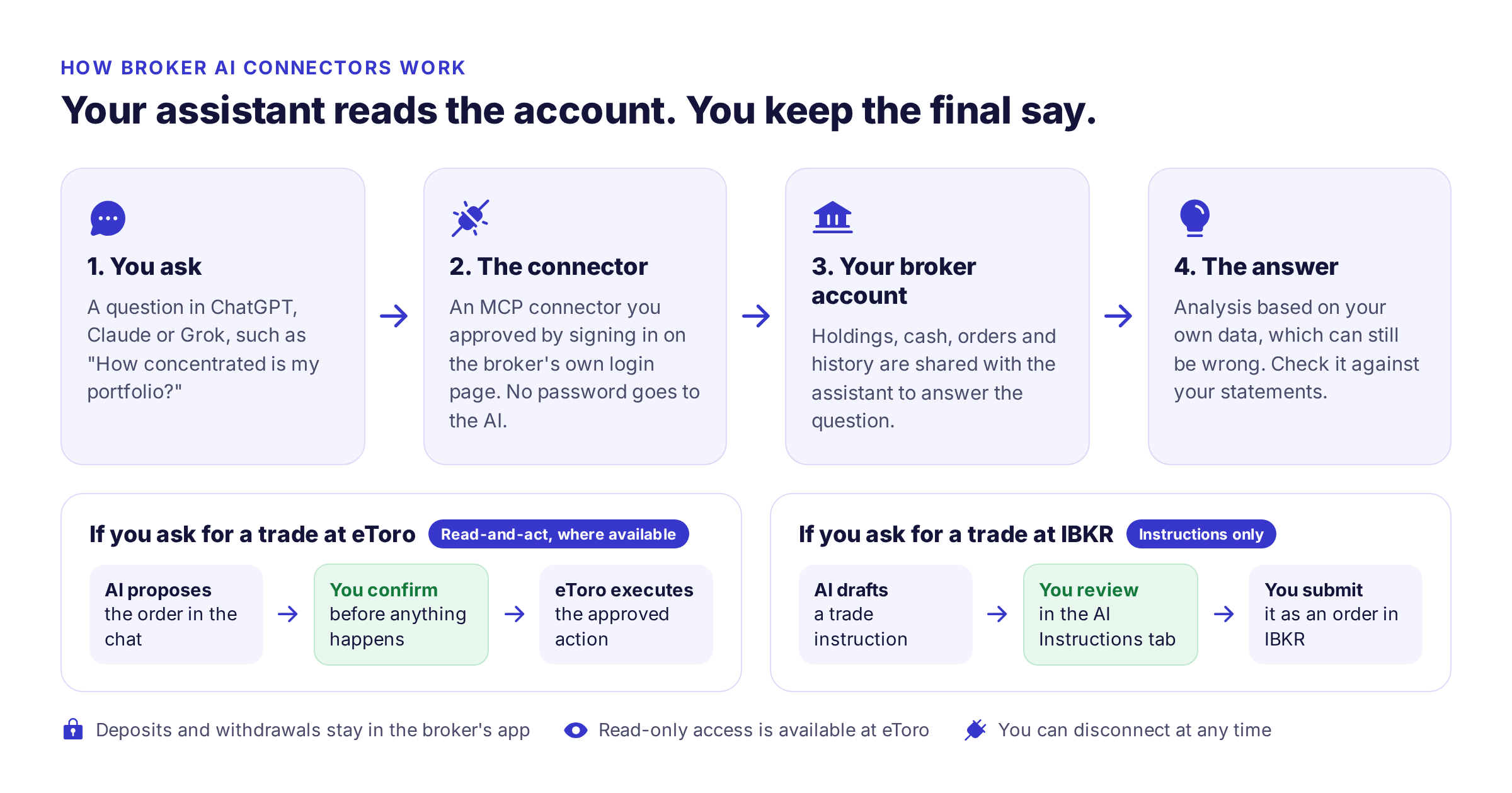
A connector is a secure bridge between your AI assistant and your broker account. When you ask a question, the assistant calls the broker through the connector, receives the account data it needs and writes an answer. You authorise the bridge once by logging in on the broker's site, and you can remove it at any time.
The important difference is what happens when a question turns into a trade. At Interactive Brokers, the AI can only prepare an instruction for you to review and submit. At eToro, the AI can propose an action in the chat if you have granted read-and-act access, and eToro carries it out only after you confirm.
What the AI can see and do at each broker
eToro
Once connected, the assistant can answer questions about your actual holdings, positions, balances and performance, as well as market data. eToro offers two levels of access. Read-only is for research and analysis. Read-and-act lets the assistant propose actions such as orders, but eToro says it is offered only where available, and capabilities vary by assistant and by regulatory jurisdiction.
The assistant you use also matters. eToro's own guide says Claude on the web can look up your account and take actions after you confirm, while the Claude Desktop app is look-up only for now. Funding and withdrawals stay inside eToro and never happen in the chat.
Interactive Brokers
IBKR gives the assistant access to authorised account information, including positions and cash balances, margin availability, realised and unrealised profit and loss, historical transactions, open orders, option chains, risk exposures, multi-currency balances and linked accounts. That makes it well suited to questions about concentration, currency risk or how a market fall would affect your portfolio.
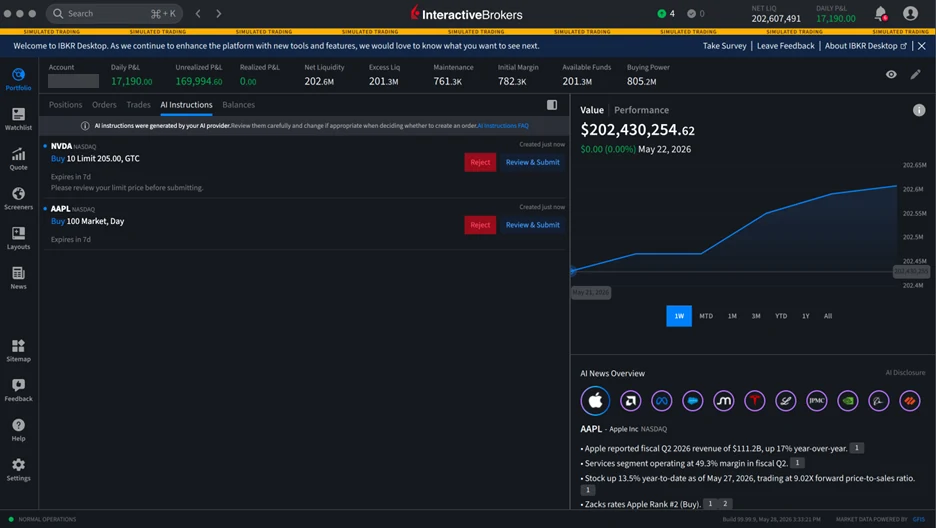
On the action side, the AI can draft trade instructions for stocks, ETFs, options, futures and futures options. Instructions never become orders automatically. They wait in the AI Instructions tab until you review, edit, discard or submit them. IBKR says the integration has no additional cost and works across Client Portal, IBKR Desktop, IBKR GlobalTrader, IBKR Mobile and Trader Workstation, which we compare in our guide to the IBKR mobile apps.
Available to EU clients. Interactive Brokers Ireland, which serves clients in the EU, offers the AI Integration on its own website. The only countries IBKR excludes are India and Japan.
SetupHow to connect eToro to ChatGPT, Claude or Grok
Setup takes a few minutes and needs no coding. In Grok, eToro is part of the official connector catalogue, so you search and connect. In Claude and ChatGPT you add eToro yourself as a custom connector, using the address in eToro's official guide for each assistant. Every route ends on eToro's own sign-in page, so you never paste a password or API key into the chat.
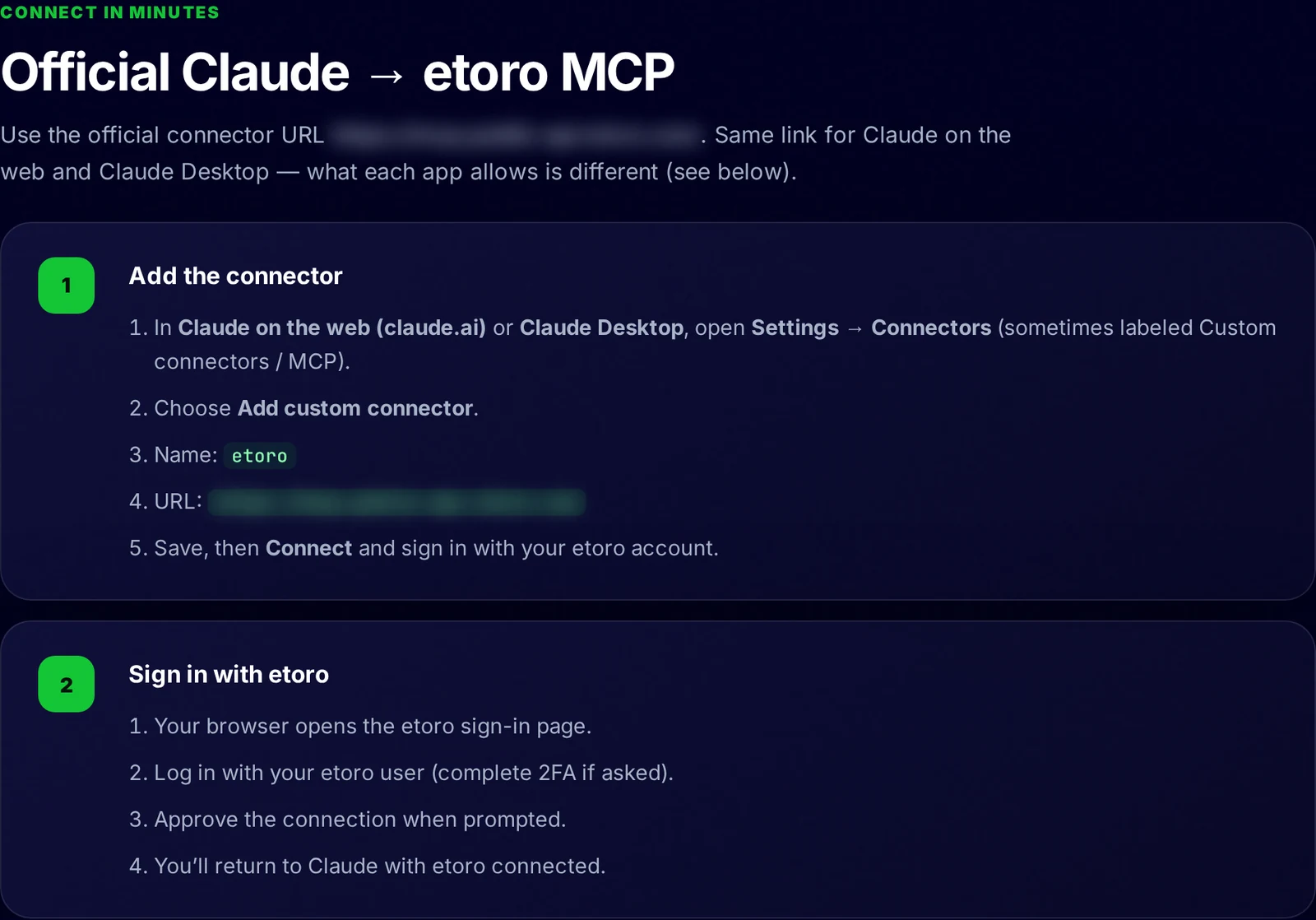
How to connect it to Claude
- In Claude on the web or Claude Desktop, open Settings, then Connectors.
- Choose Add custom connector, name it eToro and paste the connector address from eToro's Claude guide.
- Save, click Connect and sign in on eToro's page, completing two-factor authentication if asked.
- Approve the connection. You return to Claude with eToro connected.
Use Claude on the web if you want the AI to take actions, which it always confirms with you first. The Claude Desktop app is look-up only for now.
How to connect it to ChatGPT
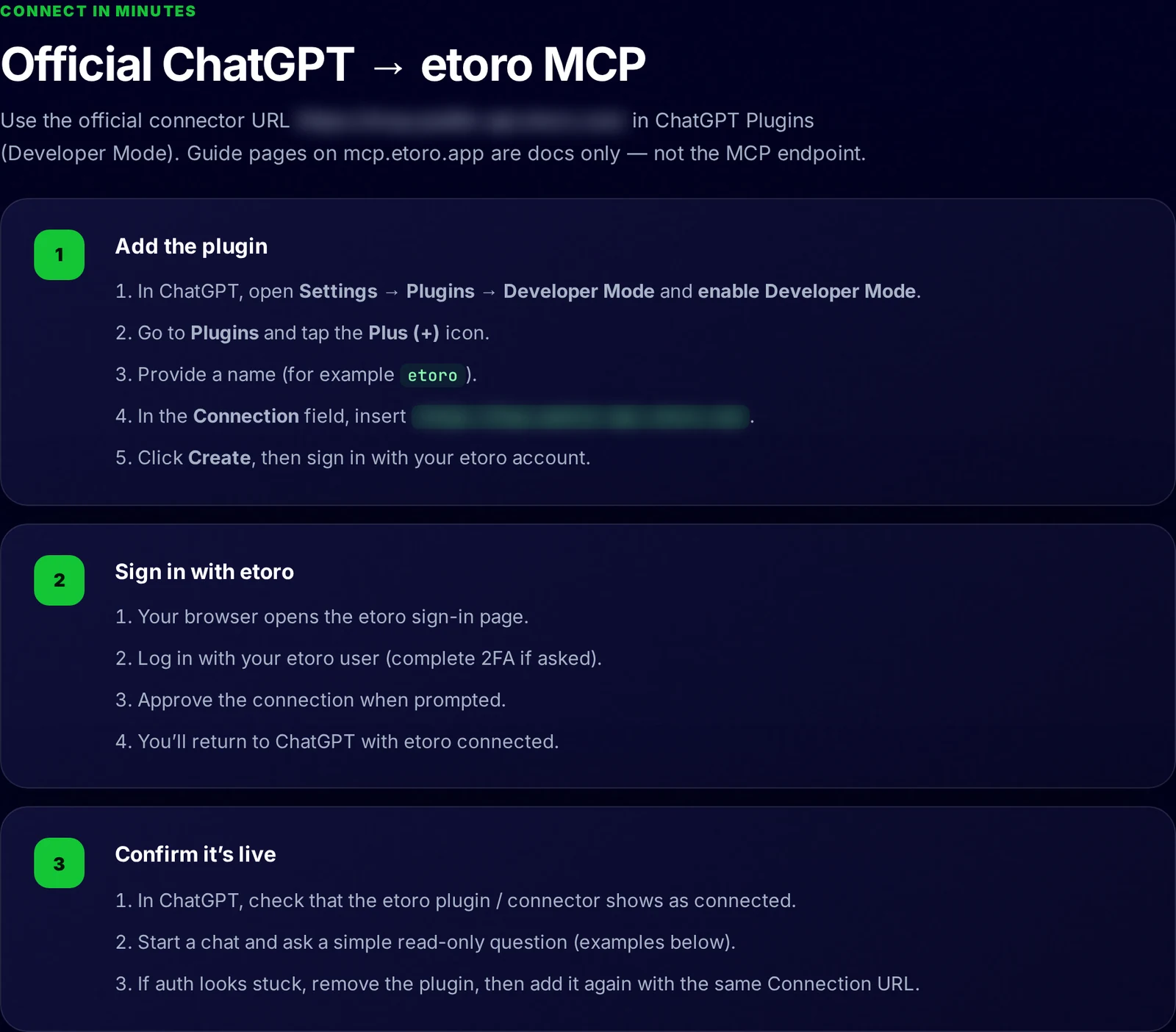
- Open Settings, then Plugins, and switch on Developer Mode.
- Go to Plugins, tap the plus icon and give the plugin a name, such as eToro.
- Paste the connector address from eToro's ChatGPT guide into the Connection field and click Create.
- Sign in on eToro's page, approve the connection and check that eToro shows as connected.
If sign-in looks stuck, eToro suggests removing the plugin and adding it again with the same address.
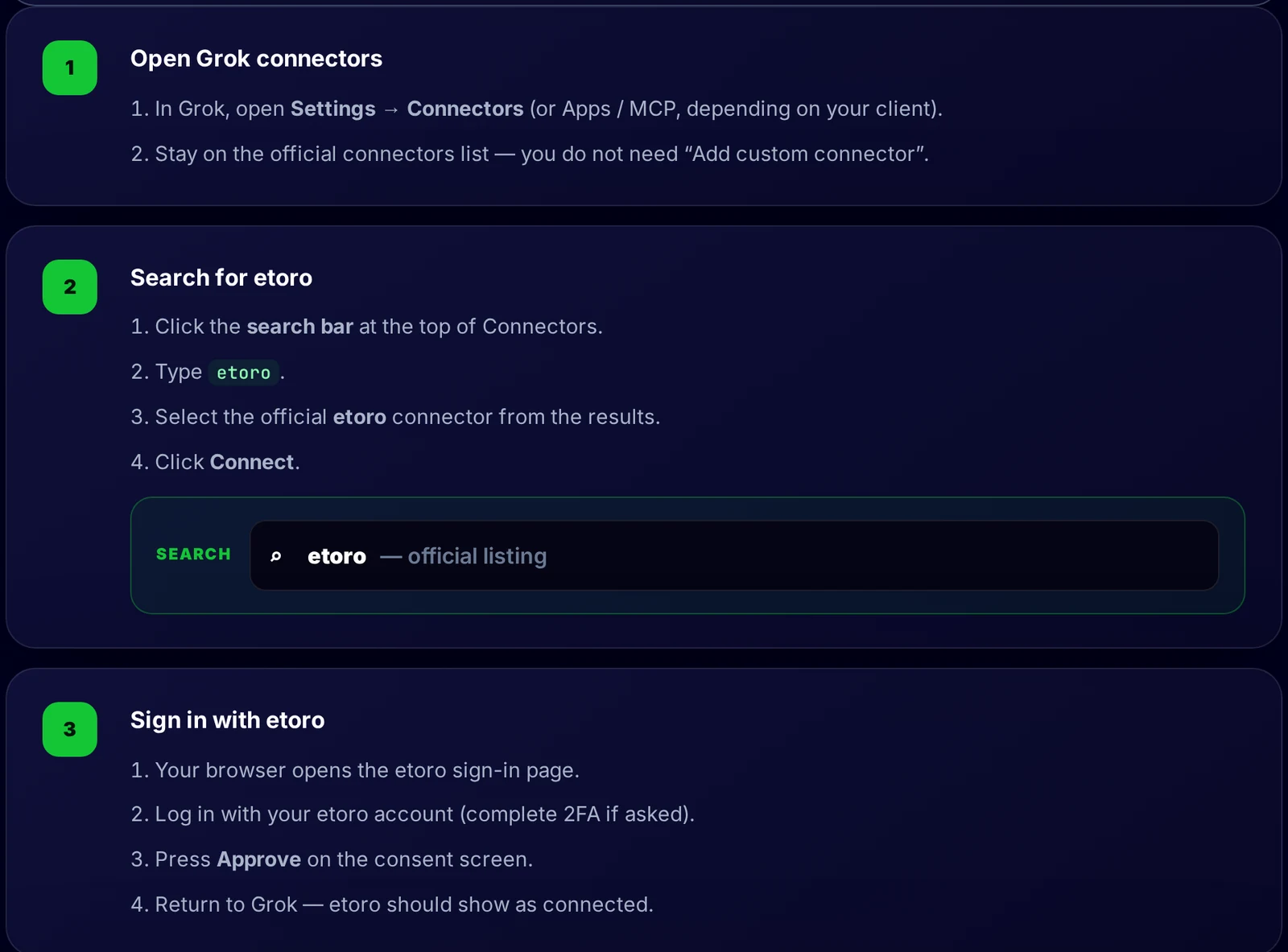
How to connect it to Grok
- Open Settings, then Connectors. You do not need a custom connector.
- Search for eToro, select eToro's official listing and click Connect.
- Sign in on eToro's page and press Approve on the consent screen.
- Return to Grok, where eToro should show as connected.
If more than one eToro result appears, choose the official listing. If an old connection gets stuck, remove it in the eToro app under Settings, then Account, and connect again from Grok.
Once connected, start with a read-only question, such as a summary of your profile or balances, and check the answer against the eToro app. If your connection allows actions, eToro suggests testing them on a demo account first. Never paste passwords, API keys or tokens into a chat. Our eToro review for EU investors covers the platform itself, including its fees and currency costs.
SetupHow to connect Interactive Brokers to ChatGPT, Claude or Grok
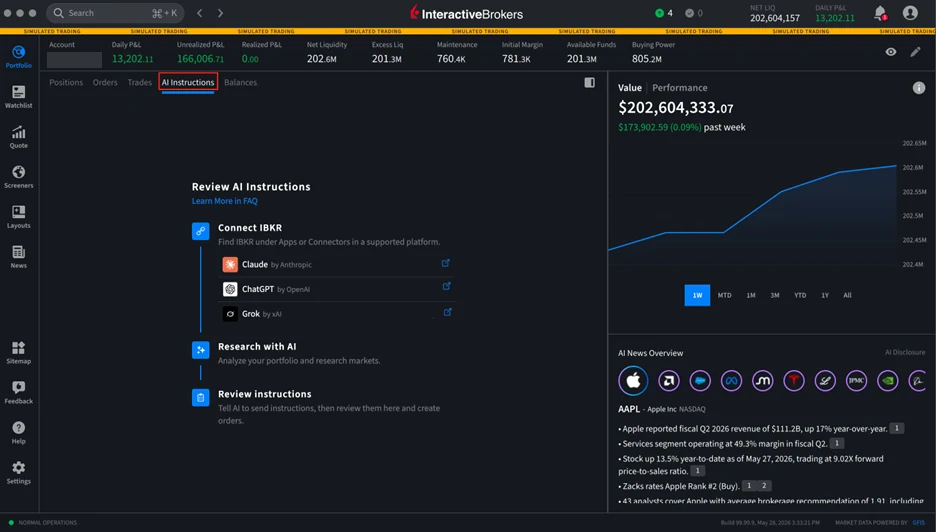
Interactive Brokers has certified connectors in the ChatGPT, Claude, Grok and Perplexity directories, so there is no address to paste: you search, connect and log in. The quickest start is the AI Instructions tab in your IBKR portfolio, which opens each assistant for you. If you use another MCP tool, such as Claude Code, ChatGPT Codex or Cursor, you can add IBKR as a custom connector using the address on IBKR's AI Integration page.
How to connect it to Claude
- In Claude, open Customize, then Connect your apps, or click Claude in IBKR's AI Instructions tab.
- Search for Interactive Brokers, choose the Interactive Brokers (IBKR) connector and click Connect.
- Log in on IBKR's secure page, read the agreements and disclosures, sign and click I acknowledge.
- If you have more than one account, pick the one to share and click Give Access.
How to connect it to ChatGPT
- In ChatGPT, open Apps, or click ChatGPT in IBKR's AI Instructions tab.
- Search for Interactive Brokers and select the certified connector.
- Log in through IBKR, accept the disclosures and give access to the account you want to connect.
How to connect it to Grok
- In Grok, open the connectors directory, or click Grok in IBKR's AI Instructions tab.
- Search for Interactive Brokers and click Connect.
- Log in through IBKR, accept the disclosures and give access to the account you want to connect.
Turning an instruction into an order
When you ask the AI to buy or sell, it creates an instruction, not an order. The instruction appears in the AI Instructions tab of your IBKR platform, where you click Review & Submit to place it or Reject to discard it. To revoke the assistant's access later, open Settings in the IBKR portal and go to Manage Third-Party Consents.
You need an active IBKR account. If you are still deciding, our Interactive Brokers fees guide for Europe explains the costs, and our article on whether Interactive Brokers is safe for European investors covers the Irish entity and investor protection.
SafetyApproval and safety controls
Both brokers keep the final decision with you, but the guard rails sit in different places.
| Control | eToro | Interactive Brokers |
|---|---|---|
| Login | eToro sign-in page with two-factor authentication | IBKR secure login screen |
| Credentials shared with the AI | No API keys or passwords | No API keys or passwords |
| Access level | Read-only, or read-and-act where available | Read and draft only |
| Trade approval | You confirm each proposed action in the chat | You confirm each order inside an IBKR app |
| Money movements | Funding and withdrawals stay in eToro | Not part of the integration |
| Practice first | Demo account supported | IBKR offers a paper trading account |
| Switch off | Pause or disconnect at any time | Revoke access in IBKR's Third-Party Consents |
Treat the approval step as a real check, not a formality. eToro warns that trades may differ from what you asked or saw, and IBKR says instructions may not be accurate or reflect what you wish to do. Read the instrument, direction, quantity, order type and price before you confirm.
What to watchRisks to understand before you connect
AI answers can be wrong
Assistants can misread data, mix up holdings or state a figure with confidence that turns out to be wrong. Neither broker guarantees the accuracy of AI output, and both say it is not investment advice. Your broker statements remain the source of truth, so check any number before acting on it.
Permissions decide what can go wrong
Read-only access cannot place trades, so it is the safer default for analysis. Read-and-act access at eToro is more convenient but raises the stakes: eToro itself warns that AI systems may perform poorly, act quickly and be difficult to stop in real time. Grant the lowest level you need, try new workflows on a demo account and disconnect integrations you no longer use.
Data privacy and GDPR
Read-only does not mean private. Every question sends account information, such as holdings, balances and transactions, to the AI provider, which handles it under its own privacy policy and settings. Depending on the provider, that data may be stored, reviewed or processed outside the EU.
GDPR gives you rights over that data, including to be told how it is used, to access it and to ask for it to be deleted. Before you connect, check the assistant's settings for chat history and whether your conversations are used to improve its models, and avoid connecting an account you would not be comfortable sharing with that provider. A work or shared AI account is a poor place for personal financial data.
Account security
A connected assistant becomes another way into your account information. Keep two-factor authentication on, secure the AI account with a strong password, and remove the connection if you lose a device or stop using the assistant.
Best fitWho broker AI connectors suit
The connectors are most useful for investors who already hold an account and want faster answers about it, not for people looking for someone else to make decisions.
- You already use eToro or IBKR. The connectors add a conversational layer to an account you have, with no new account to open or fund.
- You want answers about your own holdings. Concentration, currency exposure, idle cash and recent trades, answered against your real positions rather than a generic example.
- You prefer to stay in control. Both brokers keep you as the final approver. IBKR adds a confirmation step inside its own app, and eToro lets you limit the connection to read-only.
- You are comfortable checking figures. The setup works best for investors who treat every AI answer as a draft to verify.
- You want an adviser. Neither broker treats AI output as investment advice, and both say they do not guarantee its accuracy.
- You are uneasy sharing financial data. Every question sends account information to the AI provider under its own privacy terms.
- You trade fast and often. AI systems can misread a request. eToro warns they may act quickly and be difficult to stop in real time.
If you mainly want a combined view of several brokers, a portfolio tracker may be the simpler tool. Our Snowball Analytics review and Delta portfolio tracker review cover two options, and our best investing tools for European investors compares more.
VerdictOur verdict
Both connectors are easy to set up, but Interactive Brokers has a slight edge. Its AI cannot execute trades directly. It can read your account and draft instructions, and you confirm every order inside the IBKR app. That extra step outside the chat is a real security barrier: a misread prompt or a wrong figure from the AI cannot become a live trade on its own. IBKR also shares a wider set of account data with the assistant and is confirmed for EU clients through its Irish entity.
eToro is just as quick to connect and goes further, letting the AI carry out an order once you confirm it in the chat, where read-and-act access is available. That is convenient, but the confirmation sits in the same conversation as the request. Start with read-only access and a demo account, and only move to read-and-act once you trust the workflow.
Whichever you use, the AI is a research assistant, not a decision maker. If you are still choosing a broker, compare the fundamentals first in our best stock brokers in Europe guide or our guide to whether eToro is safe for European investors.
FAQFrequently asked questions
Yes. Since 8 October 2026 eToro has offered an official connector for ChatGPT, as well as Claude, Grok and Grok Bot. In ChatGPT you enable Developer Mode, add eToro with the address from eToro's setup guide and sign in with your eToro account. Capabilities vary by assistant and country, and the connectors are not available to clients in the US, Australia or Singapore.
Yes. Interactive Brokers Ireland, the entity that serves EU clients, offers the AI Integration on its own website, and IBKR lists India and Japan as the only countries where it is not available. As with any IBKR feature, product access still depends on your account and permissions.
At Interactive Brokers, no. The AI drafts an instruction and you submit it as an order in an IBKR platform. At eToro, only if you grant read-and-act access where it is available, and every proposed action needs your approval. With read-only access, the AI cannot act at all.
Interactive Brokers says there are no additional costs and no separate account to open. eToro's announcement does not mention a charge for the connectors. Your AI assistant's own plan and limits still apply, and they differ between products.
GDPR applies, but it does not stop the data leaving your broker. Each question sends account information to the AI provider, which processes it under its own privacy terms. You can review its data settings, ask what it holds and request deletion. Connect only an account you are comfortable sharing in that way.
Remove the connector in your assistant's settings. eToro says you can pause or disconnect at any time, and its Grok guide adds that an old connection can also be removed in the eToro app under Settings, then Account. Disconnecting stops new requests but does not delete chats already saved by the AI provider.
Both are easy to set up, but Interactive Brokers has a slight edge. Its AI cannot execute trades directly: it drafts instructions, and you confirm every order inside the IBKR app, which adds an extra security barrier. eToro can let the AI carry out an order after you confirm it in the chat, where read-and-act access is available. If you have neither account, choose the broker on fees and features first and treat the AI connectors as a bonus.
Not yet. As of 16 October 2026, Trading 212 has no official connector for ChatGPT, Claude or Grok. It offers a public API, still in beta, and an experimental plugin for developer tools such as Claude Code, both of which work through API keys you create in the app. A key with order permissions lets the tool place real trades without a separate confirmation in the Trading 212 app, and Trading 212 itself warns that AI tools can misinterpret instructions. If you try it, start with a demo account or a key without order permissions, and never paste keys into a chat.
Featured partner: Capital at risk. Provider of the investment services is Lightyear Europe AS for the EU. Terms apply: lightyear.com/terms. Seek qualified advice if necessary. This is not investment advice. Sponsored Link.